takatopup

Enterprise Pharmacy Management

PHARMADESK PRO

Professional System Software

Complete pharmacy POS and inventory software for modern drug stores, retail pharmacies, medical retailers, and multi-counter local network setups. Manage billing, stock, purchases, invoices, staff access, and reports from one reliable system.
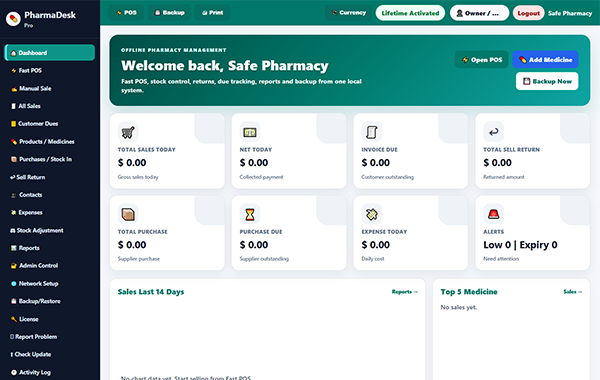
PharmaDesk Pro pharmacy POS and inventory software interface

Trusted by Growing Pharmacy Businesses Globally

PharmaDesk Pro Pricing

Choose the Right Setup for Your Pharmacy

Smart POS billing, medicine inventory, purchase management, sales reports, role-based access, invoice printing, and reliable local network support.

💊

Solo Pharmacy

Single-counter pharmacy

$49.99 USD
1 main PC / single counter
  • POS billing
  • Invoice printing
  • Medicine stock management
  • Lifetime license use
  • No future update support
Get Solo Plan
🏪

Growing Pharmacy

Small pharmacy with local team

$99.99 USD
1 main PC + 2 client PCs
  • Everything in Solo
  • Local network support
  • Customer & supplier records
  • Expiry tracking
  • 4 months update support
Get Growing Plan
🏢

Enterprise Pharmacy

Large or multi-counter setup

$199.99 USD
1 main PC + 9 client PCs
  • Everything in Professional
  • Custom setup available
  • Large-team access control
  • Priority setup guidance
  • 12 months update support
Get Enterprise Plan
Custom deployment available

Need 15, 20, 50, or 100+ computers?

Perfect for pharmacy chains, hospitals, and multi-location businesses.

Request Custom Quote

Prices start from the listed amount. Final price may vary depending on setup, customization, installation, and support requirements.

PharmaDesk Pro pharmacy management software
Included in Every Plan

Core Pharmacy Management Features

PharmaDesk Pro gives your pharmacy the essential tools to manage billing, stock, purchases, sales, customers, suppliers, staff access, and reports from one reliable system.

POS billing
Invoice printing
Medicine stock
Purchase records
Customer records
Supplier records
User role control
Business reports
How PharmaDesk Pro Works

Simple Setup, Real Pharmacy Workflow

Install PharmaDesk Pro on your main PC, activate your license, add medicines and staff, then start POS billing, invoice printing, stock tracking, and pharmacy reports.

01

Install Main PC

Set up PharmaDesk Pro on the main pharmacy computer where your local database is stored.

02

Activate License

Enter your purchase email and license key. Your plan controls main PC and client PC limits.

03

Add Medicines

Add products, batches, expiry dates, purchase price, selling price, and stock quantity.

04

Create Staff Login

Add salesmen, cashiers, stock managers, or admins with role-based access control.

05

Start Billing

Use fast POS billing, receive payments, print invoices, and update stock automatically.

06

Check Reports

View sales, profit, due balance, purchases, expenses, low stock, and expiry reports.

Why Choose PharmaDesk Pro

Built for Speed, Control, and Local Reliability

A practical pharmacy POS and inventory management software for single-counter pharmacies and multi-PC local network setups.

Fast POS Billing

Search medicines, create sales, accept payments, and print invoices quickly.

💊

Stock & Expiry Control

Track medicine stock, batches, expiry dates, purchase price, and selling price.

🌐

Local Network Support

Connect supported client PCs to one main PC for multi-counter pharmacy billing.

🔐

Role-Based Access

Give staff access only to the sections they need for their daily work.

📊

Business Reports

Check daily, weekly, monthly, yearly, or custom date pharmacy reports.

💾

Backup & Restore

Keep your pharmacy data safer with local backup and restore options.

FAQ

Frequently Asked Questions

Quick answers about PharmaDesk Pro license plans, offline use, network PCs, update support, and pharmacy POS features.

Can I use PharmaDesk Pro without internet?

Yes. After activation, daily POS billing, stock management, invoice printing, purchases, sales records, and reports can work locally on your PC.

Do I need internet for activation?

Yes. Internet is required for license activation, license checking, update checking, and online support requests.

Can I use multiple computers?

Yes, depending on your plan. The main PC stores the database, and client PCs connect through the same local network.

Does it support invoice printing?

Yes. PharmaDesk Pro supports customer invoice printing and keeps sales records for checking, returns, and due payment tracking.

Can I control staff access?

Yes. Owner/admin can create staff accounts and control permissions for sales, stock, reports, settings, backup, and other sections.

Are updates automatic?

No. Updates are not forced. Admin can manually check updates. Update support depends on the selected plan.

Can I upgrade my plan later?

Yes. You can start with a single-counter setup and upgrade later to a multi-PC local network plan.

Is custom setup available?

Yes. Custom deployment is available for 15, 20, 50, or 100+ computers, pharmacy chains, hospitals, and multi-location businesses.

Ready to Start?

Manage Your Pharmacy Smarter with PharmaDesk Pro

Start with a single-counter pharmacy setup or upgrade to a multi-PC local network system. PharmaDesk Pro helps you manage POS billing, medicine stock, invoice printing, purchases, customer records, staff access, and business reports from one reliable pharmacy software.

✓ Lifetime license options ✓ Offline-first pharmacy POS ✓ Local network client PC support ✓ Role-based staff access
Choose a Plan Contact Sales Need 15, 20, 50, or 100+ computers? Contact us for custom setup.
Before You Buy

System Requirements and Support Policy

PharmaDesk Pro is a desktop-based pharmacy POS and inventory management software. Please check the basic requirements and support details before choosing your plan.

🖥️

System Requirements

Operating System: Windows 10 or Windows 11 recommended.

Main PC: Required for database, billing, stock, and local server use.

Network: Same local WiFi/LAN required for client PC access.

Printer: Normal A4 printer or POS thermal printer support.

Internet: Required for license activation, update check, and support requests.

Storage: Keep enough free space for database, invoices, and backups.

🛟

Support and Update Policy

Lifetime License: You can keep using your activated version according to your plan.

Update Support: Update support depends on your selected plan.

No Forced Updates: Admin can manually check updates. Updates are not forced automatically.

Setup Support: Final setup cost may vary for custom installation or large PC requirements.

Backup Responsibility: Pharmacy owner should keep regular local backups.

Custom Deployment: Available for 15, 20, 50, or 100+ computer setups.

Need help choosing the right plan?

Contact us if you are not sure which setup is best for your pharmacy, local network counters, printer type, or custom PC limit.

Ask Before Buying
Scroll to Top